Universal In-App Floating Notification Inbox SDK Integration Guide
📁 Getting Started
🕐 Updated 2 hours ago
 HyperPush X Docs
The HyperPush X Universal In-App Floating Notification Inbox SDK allows developers and website owners to embed a real-time, customizable floating notification inbox widget on any website or web application (Custom HTML, React, Vue, Next.js, Shopify, Wix, Squarespace, Laravel, PHP, Node.js, etc.).
[!IMPORTANT] Premium Plan Feature: The Universal In-App Floating Notification Inbox SDK requires an active HyperPush X Premium subscription. Sites on Free or expired plans will receive a console warning and the widget will remain hidden until upgraded.
As a website owner on a Premium Plan, you can manage and customize your Floating Notification Inbox directly from your HyperPush X Dashboard > Connected Websites > Customizer:
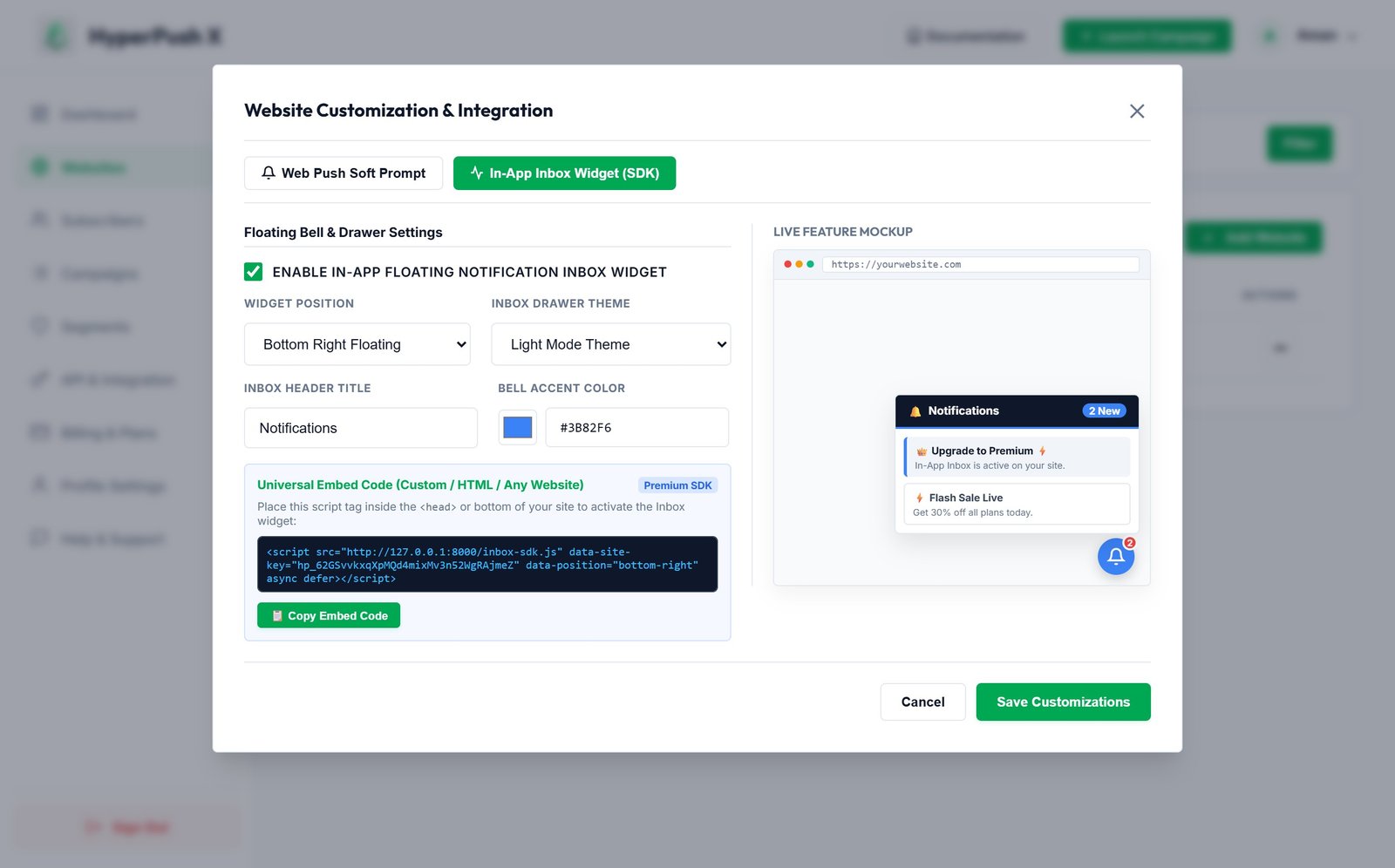
#00a854, #3b82f6, #9333ea).Below is the live user-facing Floating Notification Inbox widget displaying expandable notification cards, timestamps, unread dot indicators, and call-to-action buttons:
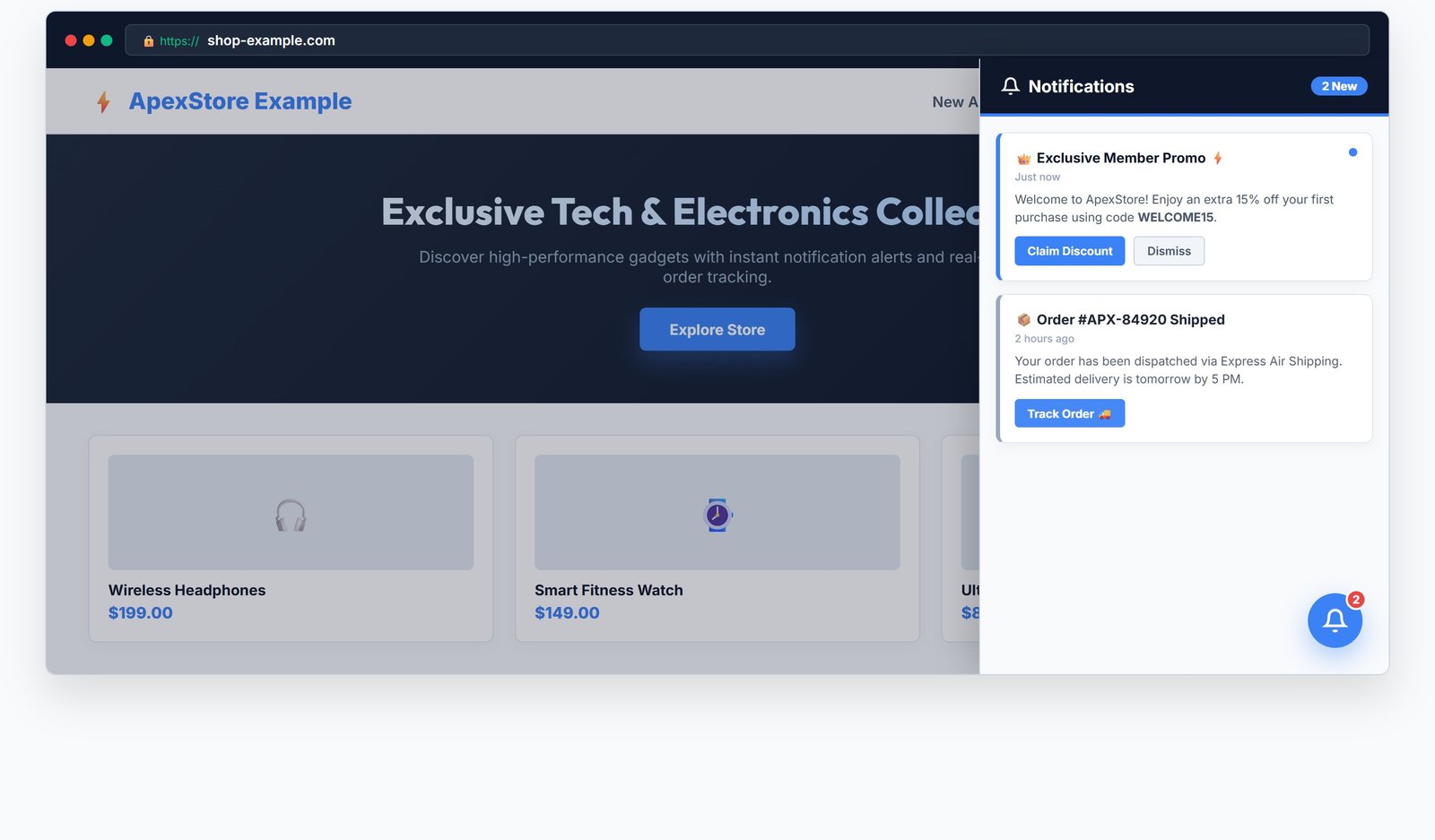
width: 400px, 100vh).max-height: 85vh) with a top handle drag bar.To add the In-App Floating Notification Inbox widget to your custom website, paste the following single <script> tag inside your website's <head> or just before the closing </body> tag:
<script src="https://hyperpushx.com/inbox-sdk.js"
        data-site-id="YOUR_WEBSITE_SITE_KEY"
        data-theme="auto"
        data-position="bottom-right"
        data-accent-color="#00a854">
</script>
Replace YOUR_WEBSITE_SITE_KEY with your site's public key (e.g. hp_abc123...) found in your HyperPush X Dashboard > Connected Websites.
You can customize the Inbox SDK appearance and positioning directly via script data attributes:
| Attribute | Type | Default | Description |
|---|---|---|---|
data-site-id |
String |
(Required) | Your unique Website Site Key (hp_...) from Dashboard. |
data-theme |
String |
"auto" |
Widget color scheme: "auto", "light", or "dark". |
data-position |
String |
"bottom-right" |
Screen placement: "bottom-right" or "bottom-left". |
data-accent-color |
Hex String |
"#00a854" |
Primary brand accent color for bell button and badges. |
data-title |
String |
"Notification Inbox" |
Header title text shown inside the inbox drawer panel. |
Paste the script tag directly before </body>:
<!-- HyperPush X Inbox SDK -->
<script src="https://hyperpushx.com/inbox-sdk.js"
        data-site-id="hp_YOUR_SITE_KEY"
        data-theme="auto"
        data-accent-color="#00a854">
</script>
In Next.js App Router or Page Router, use the Script component:
import Script from 'next/script';

export default function RootLayout({ children }) {
  return (
    <html lang="en">
      <body>
        {children}
        <Script
          src="https://hyperpushx.com/inbox-sdk.js"
          data-site-id="hp_YOUR_SITE_KEY"
          data-theme="auto"
          strategy="afterInteractive"
        />
      </body>
    </html>
  );
}
In Nuxt 3 nuxt.config.ts:
export default defineNuxtConfig({
  app: {
    head: {
      script: [
        {
          src: 'https://hyperpushx.com/inbox-sdk.js',
          'data-site-id': 'hp_YOUR_SITE_KEY',
          'data-theme': 'auto',
          defer: true
        }
      ]
    }
  }
})
The SDK automatically registers a global window.HyperPushInbox object allowing full JavaScript control over the inbox widget:
// Open the inbox drawer
window.HyperPushInbox.open();

// Close the inbox drawer
window.HyperPushInbox.close();

// Toggle inbox panel state
window.HyperPushInbox.toggle();

// Dynamically inject a live notification card
window.HyperPushInbox.add({
    title: "⚡ Special Offer",
    body: "You unlocked a 20% discount!",
    icon: "🎉",
    btn1: "Claim Offer",
    btn1_url: "https://yoursite.com/claim"
});

// Force theme toggle ('dark' or 'light')
window.HyperPushInbox.setTheme('dark');
To enable the Floating Notification Inbox widget for your subscribers, navigate to Billing & Subscriptions in your dashboard or visit HyperPush X Pricing and select the Premium Plan.
 Notification Inbox
3
Notification Inbox
3