Programmatic Push API
📁 Developer API & Security
🕐 Updated 1 month ago
 HyperPush X Docs
Trigger high-speed, targeted push notifications directly from your custom backend services, mobile apps, or CRM workflows using the HyperPush X REST API.
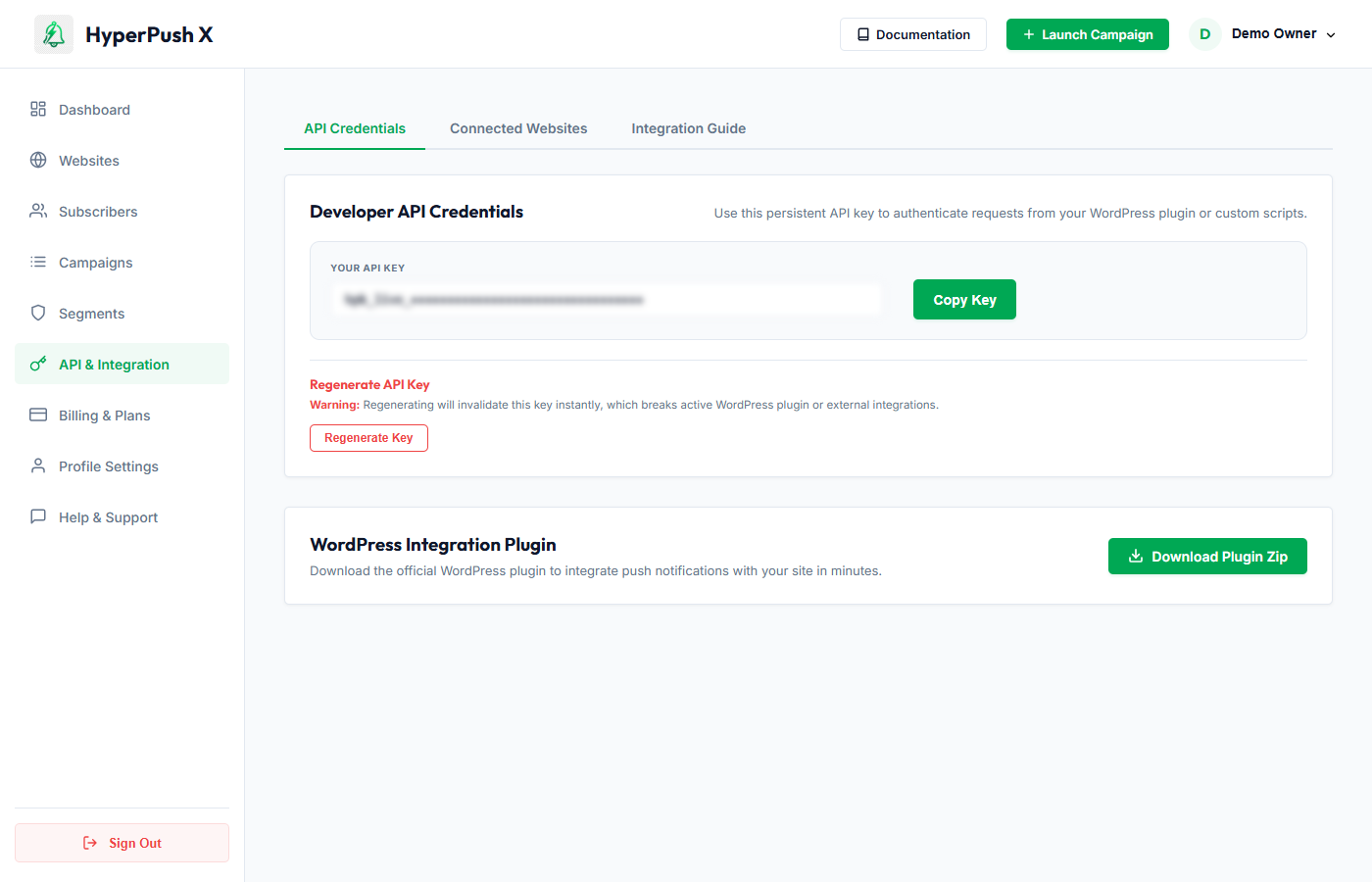
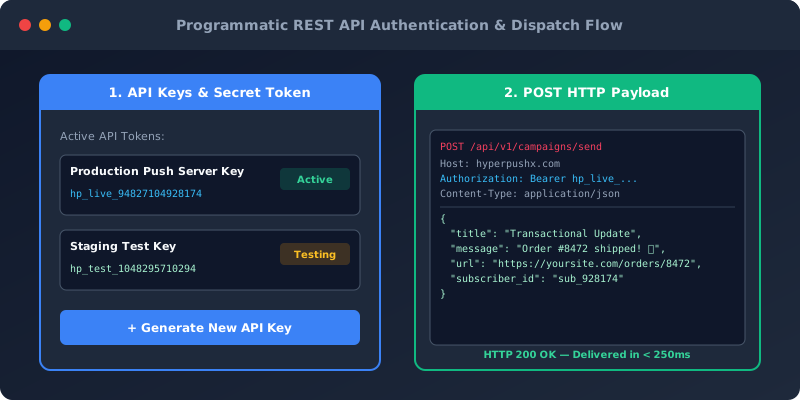
All HTTP requests to the HyperPush X REST API require authentication using your Secret API Key passed in the HTTP Authorization request header:
Authorization: Bearer YOUR_API_SECRET_KEY
Content-Type: application/json
Accept: application/json
[!IMPORTANT] Keep your Secret API Key strictly confidential. Never expose your Secret API Key in client-side HTML, JavaScript, or public code repositories.
POST https://yoursite.com/api/v1/campaigns/send
| Header | Value | Required |
|---|---|---|
Authorization |
Bearer YOUR_API_SECRET_KEY |
Yes |
Content-Type |
application/json |
Yes |
{
  "title": "⚡ Flash Sale Alert!",
  "message": "Get 25% off all electronics for the next 2 hours only.",
  "url": "https://yoursite.com/deals/flash-sale",
  "icon": "https://yoursite.com/assets/flash-icon.png",
  "banner": "https://yoursite.com/assets/hero-banner.jpg",
  "segment_id": "9b1deb4d-3b7d-4bad-9bdd-2b0d7b3dcb6d",
  "schedule_at": null
}
title (string, required): Headline text (max 60 characters recommended).message (string, required): Notification body text (max 120 characters recommended).url (string, required): Destination web page URL opened when the user clicks the notification.icon (string, optional): Absolute image URL for the brand logo thumbnail.banner (string, optional): Absolute image URL for the 2:1 ratio rich media hero banner (supported on Android & Windows Desktop).segment_id (uuid, optional): Target specific subscriber segment ID. Omit to dispatch to all active subscribers.schedule_at (ISO 8601 string, optional): Schedule future delivery (e.g. 2026-10-01T14:00:00Z).curl -X POST "https://yoursite.com/api/v1/campaigns/send" \
-H "Authorization: Bearer YOUR_API_SECRET_KEY" \
-H "Content-Type: application/json" \
-d '{
"title": "Order Shipped! 📦",
"message": "Your order #10482 has been shipped and is on its way.",
"url": "https://yoursite.com/orders/10482"
}'
use Illuminate\Support\Facades\Http;

$response = Http::withToken('YOUR_API_SECRET_KEY')
    ->post('https://yoursite.com/api/v1/campaigns/send', [
        'title' => 'Order Shipped! 📦',
        'message' => 'Your order #10482 has been shipped.',
        'url' => 'https://yoursite.com/orders/10482',
    ]);

if ($response->successful()) {
    $result = $response->json();
    // Handling dispatch success
}
const axios = require('axios');

async function sendPushNotification() {
    try {
        const response = await axios.post('https://yoursite.com/api/v1/campaigns/send', {
            title: 'Order Shipped! 📦',
            message: 'Your order #10482 has been shipped.',
            url: 'https://yoursite.com/orders/10482'
        }, {
            headers: {
                'Authorization': `Bearer YOUR_API_SECRET_KEY`,
                'Content-Type': 'application/json'
            }
        });
        console.log('Dispatch ID:', response.data.campaign_id);
    } catch (error) {
        console.error('Push Dispatch Error:', error.response.data);
    }
}
import requests

url = "https://yoursite.com/api/v1/campaigns/send"
headers = {
    "Authorization": "Bearer YOUR_API_SECRET_KEY",
    "Content-Type": "application/json"
}
payload = {
    "title": "Order Shipped! 📦",
    "message": "Your order #10482 has been shipped.",
    "url": "https://yoursite.com/orders/10482"
}

response = requests.post(url, json=payload, headers=headers)
print(response.json())
| Code | Status | Meaning |
|---|---|---|
200 OK |
success |
Campaign notification queued and dispatched successfully. |
400 Bad Request |
error |
Invalid JSON syntax or missing required fields. |
401 Unauthorized |
error |
Missing or invalid Authorization: Bearer API key header. |
422 Unprocessable Entity |
error |
Validation failed (e.g., malformed destination URL or segment ID not found). |
429 Too Many Requests |
error |
API rate limit exceeded (standard tier limit: 60 requests/min). |
 Notification Inbox
3
Notification Inbox
3