Browser and Device Compatibility Guide
📁 Getting Started
🕐 Updated 1 month ago
 HyperPush X Docs
Welcome to the HyperPush X Browser & Device Compatibility Guide. HyperPush X delivers instant, reliable web push notifications across desktop, tablet, and mobile devices without requiring your visitors to download any mobile app.
This guide provides a comprehensive overview of supported operating systems, browser engines, mobile platform requirements (including iOS PWA mode), background delivery behavior, and troubleshooting steps for common device settings.
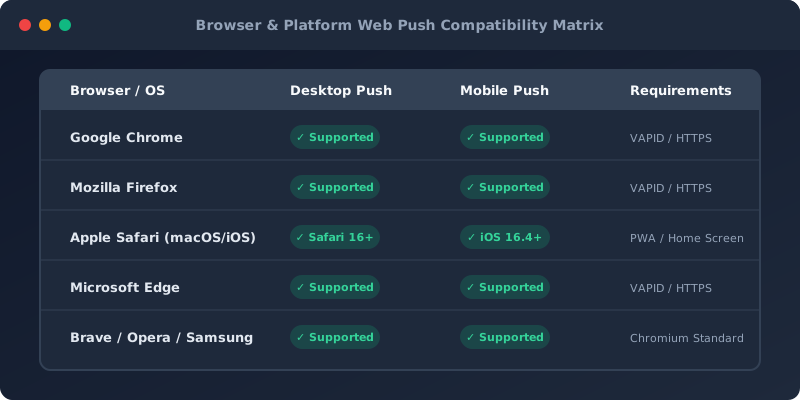
HyperPush X supports all standard W3C Web Push protocols. Below is a detailed feature support matrix across operating systems and web browsers:
| Operating System | Browser Engine | Desktop Push | Mobile Push | Rich Media (Images) | Custom Action Buttons | Background Delivery (Browser Closed) |
|---|---|---|---|---|---|---|
| Windows 10 / 11 | Google Chrome | ✅ Full | N/A | ✅ Yes | ✅ Yes | ✅ Yes |
| Windows 10 / 11 | Microsoft Edge | ✅ Full | N/A | ✅ Yes | ✅ Yes | ✅ Yes |
| Windows 10 / 11 | Mozilla Firefox | ✅ Full | N/A | ✅ Yes | ✅ Yes | ✅ Yes |
| macOS (13+ Ventura/Sonoma) | Apple Safari | ✅ Full | N/A | ✅ Yes | ✅ Yes | ✅ Yes |
| macOS (10.15+) | Chrome / Firefox / Edge | ✅ Full | N/A | ✅ Yes | ✅ Yes | ✅ Yes |
| Android (5.0+) | Google Chrome | N/A | ✅ Full | ✅ Yes | ✅ Yes | ✅ Yes |
| Android (5.0+) | Samsung Internet | N/A | ✅ Full | ✅ Yes | ✅ Yes | ✅ Yes |
| Android (5.0+) | Firefox / Brave / Opera | N/A | ✅ Full | ✅ Yes | ✅ Yes | ✅ Yes |
| iOS / iPadOS (16.4+) | Safari (Home Screen PWA) | N/A | ✅ Full | ✅ Yes | ✅ Yes | ✅ Yes |
| iOS / iPadOS (16.4+) | Safari (Standard Web) | N/A | ❌ Blocked by Apple | N/A | N/A | N/A |
| Linux (Ubuntu/Debian) | Chrome / Firefox | ✅ Full | N/A | ✅ Yes | ✅ Yes | ✅ Yes |
Starting with iOS 16.4 and iPadOS 16.4, Apple enabled Web Push notifications for iPhone and iPad users. However, Apple enforces specific iOS privacy and architecture rules:
[!IMPORTANT] Apple's Home Screen PWA Requirement:
On iOS, Web Push notifications can only be triggered if the user adds your website to their iPhone/iPad Home Screen as a Progressive Web App (PWA). Standard Safari tab browsing does not allow direct notification popups.
[!TIP] Automatic iOS PWA Banners with Hyper PWA:
If you use our free Hyper PWA or HyperPush X Pro WordPress plugin, the plugin automatically detects iOS visitors and displays an interactive "Add to Home Screen" step-by-step banner to maximize iOS subscriber conversions!
Android provides native OS-level notification integration for all major mobile web browsers:
[!NOTE] Android Battery Optimization:
On some aggressive Android manufacturer builds (such as Xiaomi MIUI, Huawei EMUI, or Samsung One UI), battery saver modes may delay background push delivery. HyperPush X automatically optimizes payload priority to ensure high delivery speed.
HyperPush X integrates directly into native desktop operating system notification centers:
When users open links inside social media apps (such as Instagram, TikTok, Facebook, LinkedIn, or Gmail), the app opens your site inside a restricted In-App Browser (WebView).
To enable push notifications on your site, ensure the following technical requirements are met:
https://) on your domain to ensure end-to-end payload security./sw.js). HyperPush X automatically registers and maintains your service worker file.https://yoursite.com).[!WARNING] Issue 1: Notifications are not appearing on my desktop
- Cause: Windows Focus Assist or macOS Do Not Disturb might be active.
- Solution: Check your OS notification center or turn off Focus mode. Ensure browser notifications are enabled in Windows Settings -> System -> Notifications or macOS System Settings -> Notifications -> [Browser Name].
[!NOTE] Issue 2: The prompt does not display when visiting the site
- Cause: The user previously clicked "Block" or "Deny" on the browser prompt.
- Solution: The user can reset permissions by clicking the Padlock Icon 🔒 in the browser address bar -> Site Settings -> Reset Permissions, then refreshing the page.
[!TIP] Issue 3: Inactive or Revoked Push Tokens
HyperPush X continuously monitors delivery feedback from browser push services. If a user uninstalls their browser or revokes permission, HyperPush X automatically marks the subscriber asInactiveto keep your subscriber roster clean and campaign CTR accurate.
No. Once a user subscribes, notifications are delivered to their OS notification system even if your website and browser are closed.
HyperPush X sets a Time-To-Live (TTL) queue on all campaigns. If a subscriber's device is offline, the push service queues the alert and delivers it the moment the device reconnects to the internet.
Yes! Using HyperPush X with PWA mode (iOS 16.4+), you can collect subscribers and send rich push notifications on iPhone and iPad without paying Apple Developer fees or building a native app.
 Notification Inbox
3
Notification Inbox
3